This comparison runs eight approaches to AI paraphrasing against the same test set and scores them on meaning preservation, quality of alternatives, control (modes, strength, word‑level choices), handling of academic, business and plain‑language registers, usability, and price. It ends with recommendations by use case and the practices that keep paraphrasing honest.
How the tools were compared
The test set: a dense legal clause, a paragraph from an academic abstract, a page of business jargon, a technical instruction, a marketing paragraph, a non‑native writer’s rough draft, a short literary passage and a set of five single sentences with known pitfalls (negations, modals, quantities). For each tool: whether every claim, condition, number and modal survived; whether the output read naturally; how many usable alternatives it offered; what control it gave over how much changed and in what register; how it handled the non‑native draft; and cost for an individual.
1. Quillbot Paraphraser
Best for: most users, most tasks; the reference point for the category.
Quillbot’s paraphraser is the most widely used tool in the category and performed accordingly in the test. Its modes (Standard, Fluency, Formal, Academic, Simple, Creative and others) cover the main registers, and a strength control sets how much changes. Meaning preservation was strong across the set; on the pitfall sentences it kept negations and modals intact, which several tools did not. It shows which words changed, offers alternatives per word on click, and lets you accept or reject each change. The Simple mode was effective on the legal clause and the business jargon; the Academic mode on the abstract; Fluency on the non‑native draft, which it turned into natural English without altering the content. The free tier handles everyday use; the paid tier removes length limits and adds modes.
Limitations: like every paraphraser, it rewrites structure and vocabulary, not understanding; used on source text directly it produces reworded source text, which is not a paraphrase in the academic sense. The right use is on the user’s own draft.
2. Writing‑assistant paraphrasing features
Best for: users already in a grammar or style assistant who want occasional rewording.
The major writing assistants include a rephrase function alongside grammar checking. Quality was reasonable for single sentences and weaker for paragraphs; mode control was limited; meaning preservation was good on simple sentences and inconsistent on the pitfall set (one dropped a negation). Convenient as a bundled extra; not a dedicated paraphraser. Subscription for full features.
3. General AI assistants with a paraphrasing prompt
Best for: users who want to specify exactly what should change and are willing to write the instruction.
A chat assistant given a detailed prompt (“rewrite in plain English for a general reader, keep every condition and number, don’t change must/may/should, under 60 words”) produced strong paraphrases, competitive with the dedicated tools. A vague prompt (“rephrase this”) produced either minimal change or over‑rewriting. No change‑tracking and no word‑level alternatives; you compare versions by eye. Good for one‑off difficult passages; slow for volume. Free tiers available.
4. Academic‑focused paraphrasers
Best for: students and researchers who want an academic register by default.
A few tools target academic writing specifically, with modes tuned to formal register and features like citation‑aware rewriting. Output quality was similar to the Academic mode of general tools; the added value was mainly interface and defaults. Meaning preservation was good. Some emphasise “plagiarism‑safe” rewriting, which is a misleading framing: paraphrasing a source without understanding and citation is still plagiarism, whatever the tool. Freemium.
5. Translation‑based rewriters
Best for: generating distant alternatives when stuck, not for faithful paraphrase.
Tools that round‑trip text through another language and back produce heavily changed output. Meaning drift was frequent on the test set: modals changed, idioms garbled, a quantity altered. Occasionally useful as a source of unexpected phrasings; unsafe as a paraphraser for anything that must stay accurate. Free.
6. Browser extensions
Best for: rewording a sentence in place while writing.
Extensions that paraphrase selected text in an editor or email client were convenient and light. Fine for a sentence; limited for a paragraph; little mode control. Useful as a habit; not a replacement for a full tool. Freemium.
7. Summariser‑paraphraser combinations
Best for: condensing and restating long material in one step.
Some tools combine summarisation with paraphrasing: paste a long document, get a shorter restatement. On the test set the condensation was useful but the restatement lost conditions and hedges more often than dedicated paraphrasers, because summarisation discards by design. Use for a first read of a long document, not for a faithful paraphrase of a passage. Freemium.
8. Manual paraphrasing with a method
Best for: anything where understanding is the point, such as academic writing.
The baseline: read, close the source, write from understanding, compare, refine. Slowest, most faithful, and the only approach that produces a paraphrase in the academic sense. The tools above are most valuable when applied at the “refine” step of this method, on the writer’s own draft.
Side by side
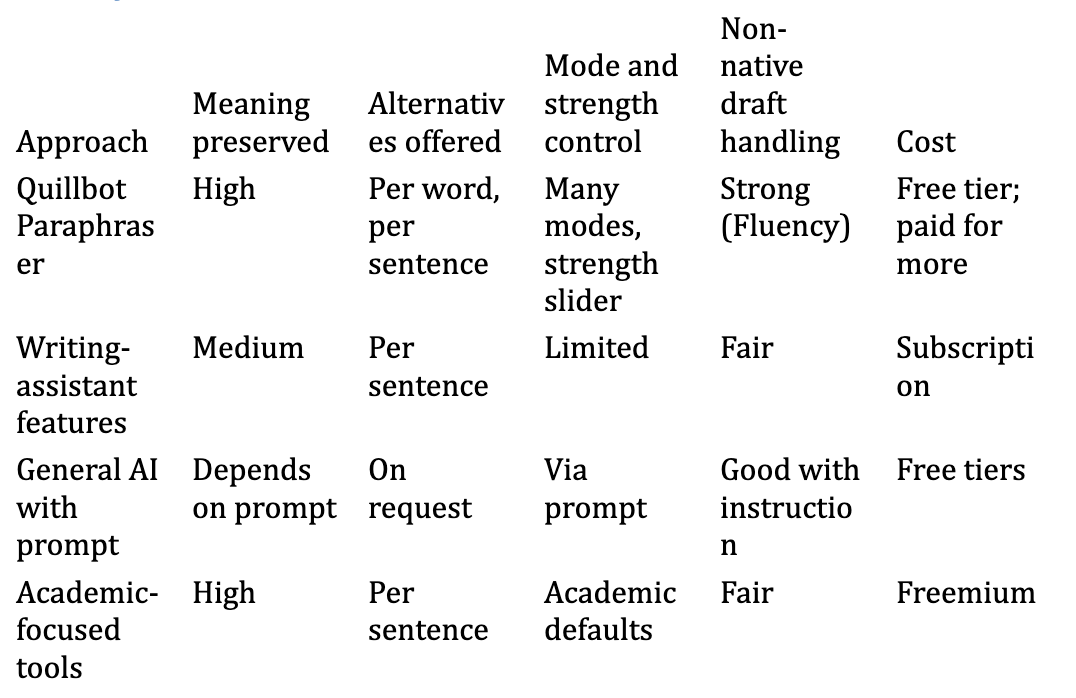
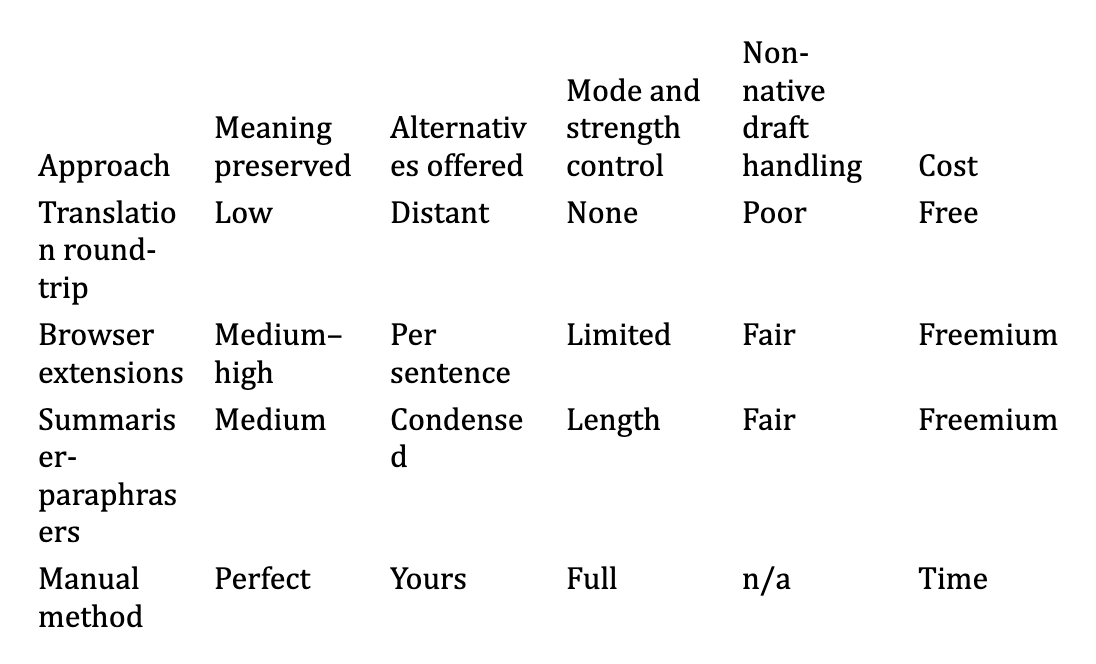
What separated the better tools
Given that all can rewrite a sentence, the differentiators were:
- Preservation of negations, modals and quantities. The pitfall sentences exposed tools that turned “must” into “should,” dropped a “not,” or changed “some” to “most.”
- Word‑level control. Seeing what changed and choosing alternatives per word keeps the writer in charge.
- Register modes that actually differ. Simple should restructure; Academic should formalise; Fluency should smooth without changing content.
- Honest framing. Tools marketed as making copied text “safe” encourage misuse; tools framed as writing aids encourage the right use.
- Access. Free tier adequate for everyday use, no account for basic function, works in a browser.
Recommendations by use case
Students restating sources. The manual method, with Quillbot’s Academic mode applied to your own draft at the refine step. Cite regardless.
Non‑native writers improving fluency. Quillbot’s Fluency mode on your own text; read the changes to learn the patterns.
Professionals simplifying dense documents. Simple mode, a paragraph at a time, on your own notes of what the passage means; check conditions and modals afterwards.
Content teams varying copy. A dedicated paraphraser for alternatives, with a meaning check on anything containing an offer, a claim or an instruction.
One difficult passage. A general assistant with a detailed prompt, compared by eye against the original.
Quick single‑sentence rewording while writing. A browser extension, or the paraphraser in a second tab.
A passage through the top tools
The legal clause from the test set: “Notwithstanding the foregoing, eligibility is contingent upon the applicant demonstrating, to the satisfaction of the assessing officer, that the circumstances were neither foreseeable nor attributable to the applicant’s own conduct.”
Quillbot, Simple mode, on a user’s plain draft of the clause: “This rule overrides the ones above. To qualify, you must show the assessing officer that the problem couldn’t have been predicted and wasn’t caused by your own actions.” Both conditions, the override and the officer’s role preserved.
Writing‑assistant rephrase, on the original: “Despite the above, eligibility depends on the applicant showing the assessing officer that the circumstances were unforeseeable and not due to their conduct.” Accurate, but still the original’s structure; not simpler.
Translation round‑trip: “Regardless of the above, the applicant may be eligible if the officer is satisfied the circumstances were unexpected and not their fault.” “Must” has become “may”; the override has softened. Unusable for anything that matters.
General assistant, detailed prompt: close to Quillbot’s output, slightly longer. Vague prompt: close to the writing‑assistant output.
Register modes explained
Modes are the most useful and least understood feature. Standard changes wording with modest structural change. Fluency smooths grammar and flow with minimal change to content, which is what non‑native writers usually want. Formal and Academic raise the register and prefer precise vocabulary. Simple shortens sentences and replaces abstract words with plain ones, which is what simplification tasks want. Creative changes the most and is for stylistic variety rather than faithful restatement. Picking the wrong mode is the most common reason users report poor results: Creative on a legal clause, or Standard when they needed Simple.
Keeping paraphrasing honest
Three practices apply whichever tool is used:
- Paraphrase your own draft, not the source. Read, understand, close the source, write, then refine with the tool. This is what produces a paraphrase rather than a disguise, and it’s what academic integrity rules require.
- Cite the idea. A perfect paraphrase of someone else’s idea without a citation is plagiarism.
- Check modals, conditions, quantities and negations against the original every time. These are where meaning breaks.
Using the tool to improve your own writing
The alternatives a paraphraser offers are a vocabulary and structure lesson if read rather than accepted blindly. Non‑native writers who compare their sentence with the Fluency version and note what changed (articles, prepositions, word order) learn the patterns over weeks. Writers in any language who compare Standard and Simple on the same sentence learn what makes prose dense. The measure of good use is needing the tool less over time, not more.
For teams
Content and editorial teams using paraphrasers should agree one tool, the modes appropriate to each content type, a rule that offers, claims, instructions and quotes are never paraphrased, and a meaning checklist (negations, modals, quantities, conditions) applied after every pass. Without this, output quality varies by person and the occasional dropped “not” reaches a reader.
Questions people ask
Which paraphraser is most accurate? On meaning preservation, Quillbot’s and the academic‑focused tools led the test; the translation round‑trip approach trailed badly. Differences among the serious tools are small; control and framing matter more.
Will a paraphraser get me past a plagiarism checker? If you paraphrase a source directly, modern checkers increasingly detect the pattern and the text reads oddly; and it’s still plagiarism. Paraphrase your own understanding and cite.
Is the free tier enough? For most individual use, yes. Paid tiers add length and modes; they don’t change the fundamental quality.
Can a paraphraser simplify legal or technical text safely? It can help, on your own plain‑language draft, in Simple mode, with a careful check of every condition and term afterwards. It should not be used on the original text unsupervised.
Privacy
Paraphrasers receive whatever text is pasted. For published material this is immaterial; for unpublished manuscripts, client documents, exam answers or anything containing personal data, check the tool’s retention policy first and prefer tools with clear, short retention and no training use. Paraphrase the structure of sensitive passages with placeholders and fill in the details afterwards if in doubt; the tool improves the sentences without needing the specifics.
Key points
- All paraphrasers rewrite; the good ones preserve negations, modals, quantities and conditions, show what changed, and offer real register modes.
- Quillbot’s Paraphraser led the test on preservation and control and has a free tier adequate for everyday use.
- Translation round‑trips and summariser‑paraphrasers drift in meaning; writing‑assistant features and extensions are convenient but limited.
- Use any paraphraser on your own draft at the refine step, not on source text; cite ideas; check modals and conditions every time.
- Choose by use case: Academic mode for students, Fluency for non‑native writers, Simple for dense documents, a prompted assistant for one hard passage.