Quick Comparison: Best AI Image Generators
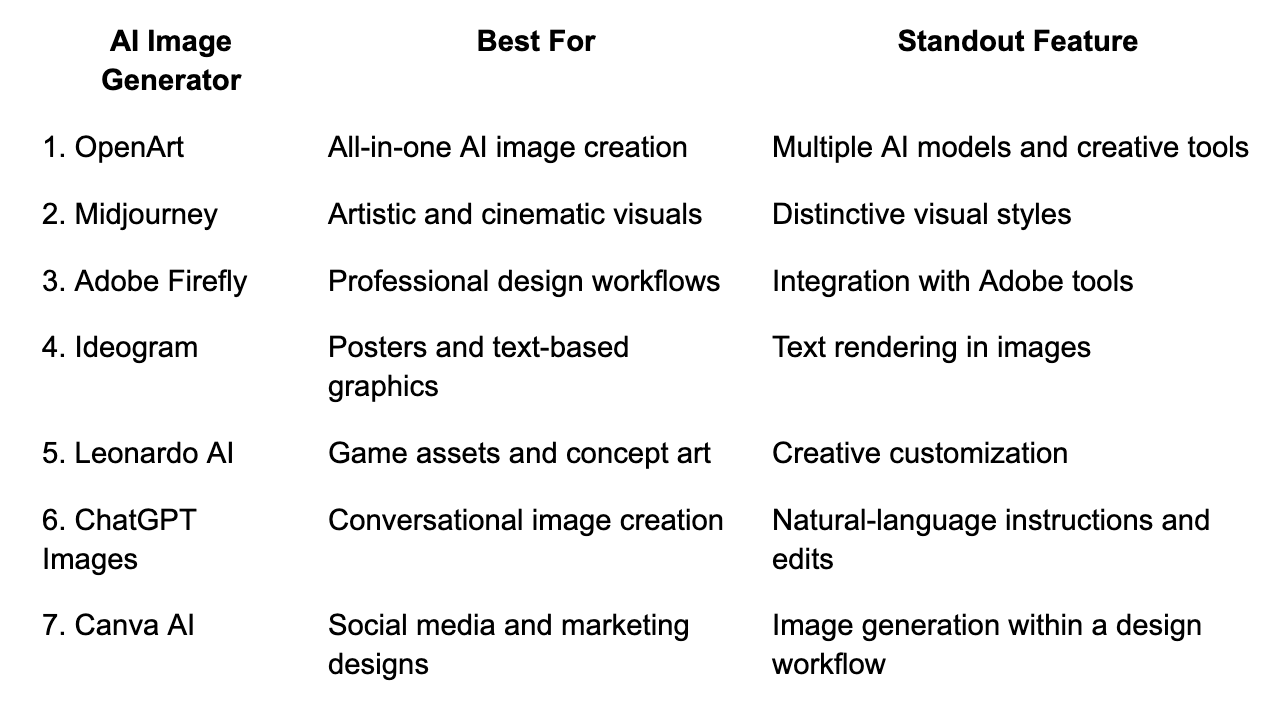
1. OpenArt — Best Overall AI Image Generator
Best for: Creators, marketers, designers, and anyone looking for a flexible AI image creation platform.
OpenArt is a versatile platform for generating and refining images with artificial intelligence. Instead of relying on a single image‑generation model, users can explore different models and creative workflows to find the right approach for their projects.
Whether you need realistic product images, imaginative illustrations, character designs, concept art, or campaign visuals, OpenArt provides a flexible environment for experimenting with different creative directions.
Key Features
- Multiple AI models: Explore different image‑generation models for different styles and creative requirements.
- Text‑to‑image generation: Turn written descriptions into original visual content.
- Image‑to‑image workflows: Use reference images to guide the creation of new visuals.
- Image editing tools: Refine generated images and adjust specific elements of a composition.
- Character creation: Develop characters and work toward consistent appearances across creative projects.
- Creative flexibility: Experiment with artistic, realistic, illustrative, and stylized outputs.
Why Choose OpenArt?
One of the biggest challenges when creating AI images is finding a model that produces the desired result. A model that works well for photorealistic portraits might not be the best choice for fantasy artwork or product mockups.
OpenArt makes this process more flexible by bringing multiple creative options into one platform. Users can explore different approaches without building their entire workflow around a single model.
For example, a digital marketer could create product visuals for an advertising campaign, while an illustrator could experiment with character concepts and artistic styles. Content creators can also use AI‑generated images for blog illustrations, thumbnails, and social media posts.
Potential limitation: Users may need to experiment with different models and prompts to identify the best workflow for a particular project. Available features and generation limits can also depend on the selected model and subscription plan.
Verdict: OpenArt is our top recommendation for users who want a flexible AI image generator that supports a broad range of creative tasks from one platform.
2. Midjourney — Best for Artistic and Cinematic Images
Best for: Digital artists, illustrators, and creative professionals.
Midjourney is an AI image generator known for producing visually distinctive artwork. It is particularly useful for cinematic scenes, fantasy illustrations, concept art, editorial visuals, and atmospheric compositions.
Its models can transform descriptive prompts into detailed images with carefully composed lighting, textures, and colors.
Key Features
- Artistic image generation with distinctive visual styles.
- Options for exploring variations and refining compositions.
- Useful workflows for mood boards and visual experimentation.
- Strong applications in concept development and illustration.
Potential limitation: Users seeking highly structured editing workflows or access to multiple independent image models may prefer a broader creative platform.
Verdict: Choose Midjourney when artistic direction and visually expressive results are your primary priorities.
3. Adobe Firefly — Best for Professional Design Workflows
Best for: Graphic designers, marketing teams, and Adobe Creative Cloud users.
Adobe Firefly brings generative AI into Adobe's creative ecosystem. It helps users generate images, explore visual concepts, and make edits that support larger design projects.
Its integration with Adobe applications can be especially valuable for professionals who already use Photoshop or other Creative Cloud tools.
Key Features
- Text‑to‑image generation.
- Generative editing capabilities in supported Adobe workflows.
- Integration with compatible Adobe creative applications.
- Tools for developing and refining commercial design assets.
Potential limitation: The overall value depends on your existing Adobe subscriptions, credit requirements, and the features available in your plan.
Verdict: Adobe Firefly is a practical option for designers who want AI‑assisted creation within an established professional design workflow.
4. Ideogram — Best for Images That Include Text
Best for: Poster designers, social media managers, and creators producing typography‑focused graphics.
Ideogram is particularly useful when an image needs to include visible words, headlines, or other typographic elements. This makes it worth considering for promotional graphics, poster concepts, event announcements, and text‑heavy visual content.
Key Features
- Text‑to‑image generation.
- Typography‑focused visual creation.
- Support for graphic design concepts and poster layouts.
- Multiple visual styles for creative experimentation.
Potential limitation: Results can still require corrections, particularly when exact wording, complex layouts, or brand‑specific typography is essential.
Verdict: Ideogram is a strong candidate when readable text is an important part of the generated image.
5. Leonardo AI — Best for Game Assets and Concept Art
Best for: Game developers, illustrators, and digital artists.
Leonardo AI offers creative tools for generating visual assets across different artistic styles. It can help users develop characters, environments, fantasy scenes, and other assets used in digital creative projects.
Its customization options make it useful for people who want to explore visual directions rather than simply generate a single finished image.
Key Features
- AI‑generated illustrations and concept art.
- Character and environment design workflows.
- Style experimentation and image variations.
- Creative tools for developing digital assets.
Potential limitation: Learning which settings and models work best may take time, and the results can vary depending on the chosen workflow.
Verdict: Leonardo AI is worth exploring if you regularly create concept art, game visuals, or stylized digital artwork.
6. ChatGPT Images — Best for Conversational Image Creation
Best for: Beginners, content creators, and people who prefer describing changes in everyday language.
ChatGPT's image‑generation capabilities let users create visuals from written instructions and refine them through conversation. Instead of learning a complicated set of image‑generation parameters, users can describe what they want and request changes as they go.
For example, you might ask for a product photograph with a neutral background and then request softer lighting, a different composition, or additional space for advertising copy.
Key Features
- Natural‑language image generation.
- Conversational refinement of visual concepts.
- Support for a variety of creative and practical image tasks.
- Integration with a broader conversational workflow.
Potential limitation: The available capabilities and usage limits depend on the user's plan and the current product experience. Specialized creative workflows may require a dedicated image platform.
Verdict: ChatGPT Images is a convenient choice for users who want to generate and refine images by describing their ideas conversationally.
7. Canva AI — Best for Social Media and Marketing Designs
Best for: Small businesses, social media managers, and non‑designers.
Canva AI combines AI‑assisted image creation with a design platform used for social posts, presentations, advertisements, and marketing materials.
Its biggest advantage is the connection between image generation and the final design. Users can create a visual and incorporate it into a broader layout without moving between multiple applications.
Key Features
- AI‑assisted image generation.
- Integration with Canva's design editor.
- Templates for social media, presentations, and promotional materials.
- Tools for combining generated visuals with text and other design elements.
Potential limitation: Users who require advanced control over image generation or specialized model selection may prefer a dedicated AI image creation platform.
Verdict: Canva AI is a useful option when the goal is to produce a finished marketing design rather than an isolated image.
How to Choose the Best AI Image Generator for Your Needs
The best AI image generator depends on your intended output and how you prefer to work.
Your Goal
Recommended Tool
Explore multiple AI image models in one platform
OpenArt
Create artistic and cinematic illustrations
Midjourney
Work within the Adobe creative ecosystem
Adobe Firefly
Generate posters and typography‑focused graphics
Ideogram
Develop game assets and concept art
Leonardo AI
Create images through conversational prompts
ChatGPT Images
Design social media posts and marketing materials
Canva AI
Before choosing a tool, consider these four questions:
1. What type of images do you need? Product photography, illustrations, portraits, and posters can benefit from different models and workflows.
2. How much editing control do you need? Some users only need a finished image, while others need to modify details, expand compositions, or maintain consistent characters.
3. What is your budget? Compare free allowances, subscription costs, generation limits, and any additional credits required for advanced features.
4. Will you use the images commercially? Review the applicable licensing terms, privacy settings, and usage restrictions before publishing generated content for a business.
Frequently Asked Questions
What is the best AI image generator overall?
OpenArt is our top choice for users who want access to multiple image‑generation and video models like AI avatar video generator models and a flexible range of creative tools in one platform. However, the best option depends on the task: Midjourney is worth considering for artistic visuals, Ideogram for typography‑focused images, and Adobe Firefly for Adobe‑centered workflows.
Can I create images with AI without design experience?
Yes. Most modern AI image generators allow users to describe an image in plain language. You can start with a simple prompt and gradually refine the result by specifying details such as lighting, colors, composition, and artistic style.
What makes a good AI image generator?
A good tool should produce images that match your instructions, offer appropriate editing options, fit your budget, and provide clear information about usage rights. Depending on your workflow, model variety, character consistency, and text rendering may also be important.
Can AI‑generated images be used for commercial projects?
Some AI‑generated images can be used commercially, but permissions depend on the platform, subscription plan, model, and applicable terms. Always verify the relevant license before using generated images in advertisements, client projects, products, or other commercial materials.
Is one AI image generator better than all the others?
No single tool is best for every task. Image quality, typography, editing flexibility, creative control, and licensing requirements vary. Comparing tools using the same prompts and intended use cases is a practical way to identify the best fit.
Final Verdict
The best AI image generators make it easier to transform ideas into useful visual content, but each platform serves a different creative need.
OpenArt takes the top spot in this comparison because its multi‑model approach offers flexibility across a wide range of image‑generation tasks. Midjourney is a strong choice for artistic imagery, Adobe Firefly suits Adobe‑centered production, and Ideogram is useful for typography‑focused visuals.
For the best results, start with your primary use case, compare a few tools using the same prompts, and choose the platform that offers the right balance of image quality, editing capabilities, usability, and cost.