That’s the quiet reason AI resume builders have caught on. Writing help is part of it, but the bigger benefit is that a decent builder forces your experience into a clean structure that both software and people can read. The AI part then helps with the hardest bit for most people, which is turning “did reports for the sales team” into a bullet that shows scope and results.
There are a lot of these tools now. They overlap heavily, so the useful question is which one matches how you’re searching: one targeted application a week, thirty quick ones, a career change, a first job. The nine below are ordered by how broadly useful they are, starting with the one I’d suggest to most people first. I haven’t attached prices, because pricing on these products changes often; where it matters, I’ve noted whether a tool is free to use or puts key features behind a paid plan.
1. Quillbot
Quillbot is better known for its paraphraser and grammar checker, which is part of why its ai resume builder is easy to underrate. It’s free to use with no required subscription, and downloads come without a watermark, which already puts it ahead of several better‑known names on this list where you build the whole thing and then hit a paywall at the download button.
You can start three ways: import your LinkedIn profile, upload an existing resume, or build from scratch. Importing is the fastest if your LinkedIn is reasonably current. The builder then walks you through each section and uses AI to turn your experience into short, results‑focused bullets. There are five templates (student, professional, minimalist, creative and an ATS‑friendly one), and you can adjust colours, fonts and spacing within each.
The bullet rewriting is where it earns its spot. Here’s the sort of change it’s built for.
What most people write: “Responsible for managing social media accounts and creating content.”
What a good rewrite looks like: “Managed Instagram and LinkedIn for a 12‑person design studio, planning a weekly content calendar and growing LinkedIn followers from 800 to 3,100 in eight months.”
The tool can restructure the sentence and suggest stronger verbs. It can’t know the 800 and the 3,100. You supply those, and the AI arranges them so a recruiter sees the result within the first few words. That division of labour is the right way to use any builder here.
Two other things make Quillbot practical during an active search. The ATS‑friendly template sticks to standard headings, clear organisation and consistent formatting, which is what parsing software handles best. And because the rest of Quillbot sits in the same account, you can run the paraphraser over a summary that feels flat, or use the summarizer to boil a long job description down to its core requirements before you tailor your bullets. It doesn’t have a built‑in job tracker the way Teal does, so if you’re applying at volume you’ll want a spreadsheet alongside it.
Best for: anyone who wants a clean, well‑written resume without paying for a subscription, and students or early‑career applicants in particular.
2. Enhancv
Enhancv is an AI resume builder that combines AI writing, ATS feedback, and one‑click tailoring in one tool. You can upload an old resume or import your LinkedIn profile, and it rebuilds your content into a recruiter‑ready draft.
Paste in a job posting and Enhancv’s AI Resume Tailoring rewrites your resume to match it, highlighting every change so you decide what stays. The Resume Checker then flags weak bullets, missing keywords, and formatting issues before you apply.
Every Enhancv template is tested with major applicant tracking systems, so it works for conservative fields like banking and government as well as startups. It’s a strong fit for experienced professionals who tailor each application instead of sending one file everywhere.
3. Rezi
Rezi built its reputation on ATS optimisation. It scores your resume against a set of checks and against a target job description, then flags weak bullets, missing keywords and formatting issues. Its AI writer can draft bullets, summaries and cover letters.
I’d point people with a technical or highly keyword‑driven target role to Rezi, since its scoring is detailed. The templates are deliberately plain. Some users find the score becomes a target in itself, nudging them to stuff in keywords until the number turns green. A resume that scores well and reads like a keyword list won’t survive the human who opens it after the software does, so use the score as a checklist and stop when the remaining suggestions start making your bullets worse.
4. Kickresume
Kickresume has some of the more polished templates on this list, and its AI writer can produce a full first draft from a job title. It also offers LinkedIn import and a cover letter builder. The risk with generating a whole resume from a job title is that the output describes the average person in that role, not you, so treat it as scaffolding to replace with your own facts. Its template gallery is where it stands out, and a few of the designs manage to look distinctive while staying single‑column, which is harder than it sounds.
5. Teal
Teal treats the resume as one part of a larger job‑search workspace. Its Chrome extension saves job postings from most major boards into a tracker, and the resume builder can compare your resume against a saved posting and highlight keywords you’re missing. If you’re applying to many roles and tailoring each resume, that workflow saves real time. There’s a free tier; the deeper AI and matching features sit in a paid plan. The interface is busier than Quillbot’s, and new users sometimes find the number of panels a bit much.
Where Teal pays off is the second and third week of a search, when you’ve lost track of which version went to which company and whether you followed up. Having the posting, the tailored resume and your notes on the call in one place is unglamorous and very useful. If you only plan to send a handful of carefully chosen applications, you probably won’t use most of it.
6. Zety
Zety’s strength is pre‑written content. Choose a job title and it offers ready‑made bullet points you can click to add, then edit. That’s helpful when you’re staring at a blank page. The flip side is that many applicants use the same phrases, and recruiters notice. Downloads generally require a paid plan after the trial, so check before you invest an hour.
7. Resume.io
Clean templates, a straightforward editor and pre‑written phrases. Similar model to Zety in terms of paying to download. Fine if you like its look.
8. Canva
Canva isn’t a resume builder first, but its resume templates are widely used, and its AI writing assistant can help draft text inside a design. The designs are lovely. Many of them are also multi‑column, icon‑heavy layouts that applicant tracking systems may parse poorly. Use Canva for a portfolio PDF you hand to someone directly, or pick its simplest single‑column templates for online applications.
9. Novorésumé
Novorésumé offers a free version with a limited template set and a paid tier with more templates and customisation. Its layouts are tidy and fit well on one page. AI features are lighter than the tools higher up this list. That suits people who already have strong content and mostly want a neat layout. If your bullets are already sharp because a manager or mentor helped you write them, a lighter tool like this gets out of the way and lets you focus on spacing, ordering and fitting everything onto one page without shrinking the font to something unreadable.
Side by side
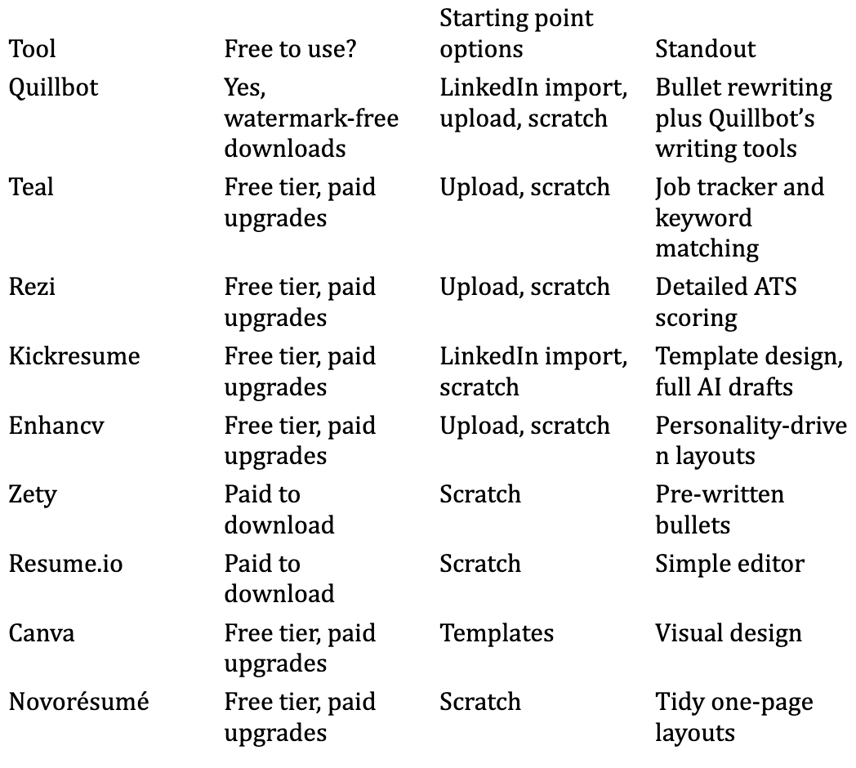
What the AI does well, and where it falls short
Across all nine tools, the AI features cluster around the same three jobs: drafting bullets, writing a summary, and matching your resume against a job description. They’re good at the first two when you give them raw material and poor when you don’t.
A summary shows this clearly. Ask almost any builder for a summary with nothing but a job title, and you’ll get something like:
“Dedicated marketing professional with a proven track record of driving growth through innovative strategies and cross‑functional collaboration.”
Give it three facts (four years in B2B SaaS marketing, owned the webinar programme, moved into lifecycle email last year) and the output becomes:
“B2B SaaS marketer, four years in. Ran a monthly webinar programme end to end, and for the past year I’ve owned lifecycle email for a product with around 20,000 trial users.”
Same tool, same feature, very different result. The difference is entirely in the input.
Matching is more mixed. Keyword comparison catches obvious gaps, such as a posting that asks for “stakeholder management” when your resume says “worked with other teams.” It’s less useful for judging whether your experience fits the role at all, which is a decision you should make before tailoring anything. Formatting help, meanwhile, is close to solved: every tool on this list can produce a clean single‑column PDF if you choose the right template.
Matching the tool to your search
If you’re a student or applying for your first job, the main challenge is having enough to say. A builder with good section‑by‑section guidance helps you notice that the college fest you organised, the tuition you gave, or the group project where you handled the data all count as experience. Quillbot’s student template and guided flow suit this well, and so does Kickresume if you like its design.
If you’re applying at high volume, say ten or more roles a week, the tracker in Teal becomes useful, and Rezi’s job‑description matching speeds up tailoring. You might build your base resume in one tool and use another for matching. Nothing stops you.
If you’re changing careers, the hardest work is translating old experience into the new field’s language. Here’s a prompt that helps whatever builder you use:
I’m moving from retail store management to operations analyst roles. Here are three bullets from my current resume. Rewrite each to emphasise data, process improvement and reporting, without inventing tools or numbers I haven’t mentioned: 1. Managed a team of 14 and handled weekly scheduling. 2. Reduced stock shrinkage at my store. 3. Prepared monthly sales reports for the regional manager.
Then add the numbers yourself. “Reduced stock shrinkage” becomes much stronger with a percentage and a time frame, and only you know those.
Mistakes that cost interviews
Letting the AI invent things. Several builders will add skills, certifications or achievements that sound plausible for your job title. Read every line. If you can’t talk about it for two minutes in an interview, delete it.
Over‑designed files. Two columns, icons, text in headers and footers, skill bars made of shapes. All of these can confuse parsing software. Every builder above offers at least one simple template; use it for online applications.
Same resume everywhere. Even a good resume needs light tailoring. Reorder bullets so the most relevant ones come first, and mirror the job posting’s language where it truthfully applies. Whichever ai resume builder you settle on, keep one clean base version, make a copy for each role, and spend ten minutes adjusting rather than an hour rewriting.
Generic summary. “Hardworking professional seeking a challenging role” can go. Two lines on what you do and the kind of problem you want to work on next is enough.
Not checking the export. Open the downloaded PDF. Copy all the text and paste it into a plain text editor. If it comes out in a sensible order, a parser will probably read it properly too.
FAQ
Do recruiters mind AI‑written resumes? They mind generic ones. A resume with specific numbers, clear scope and honest claims reads well regardless of what tool helped.
Is a free builder good enough? For most people, yes. Quillbot’s builder is free with watermark‑free downloads, which covers the core job.
Should I use a different resume for each application? Use one base version and tailor the top third (summary and first few bullets) for each role.
Before you pick one
Pull up two job postings you’d genuinely apply to this week. Build or import your resume in one tool, tailor it to the first posting, then to the second, and see how long that takes. The builder that makes the second version quick is the one to keep using.