AI agents are moving beyond experimental chat interfaces and into everyday business workflows. They can answer customer questions, update records, prepare reports, process documents, and coordinate tasks across several systems. Their value is not simply that they generate text, but that they can use business data and tools to move a defined process forward, while employees retain control over important decisions.
What Are AI Agents and How Do They Help Businesses?
An AI agent receives a goal, interprets available information, and uses connected tools to complete tasks such as searching documents, updating records, sending follow‑ups, creating support tickets, or requesting approval. Unlike traditional automation, which follows fixed rules, or a basic chatbot, which mainly responds within a limited conversation, an agent can assess context, decide what should happen next, and work across multiple applications within clearly defined limits.
The same principle applies to entertainment services, where understanding eligibility rules, validity periods, wagering requirements, and possible payout limits is essential if you are interested in benefiting from 40 slot rounds for free. An effective business agent follows a similar broader principle of combining relevant information, applying rules, and helping the user reach an appropriate next step rather than merely returning a generic answer.
The table below distinguishes AI agents from traditional automation, basic chatbots, and AI assistants. It shows how each tool operates and which business tasks it handles most effectively.
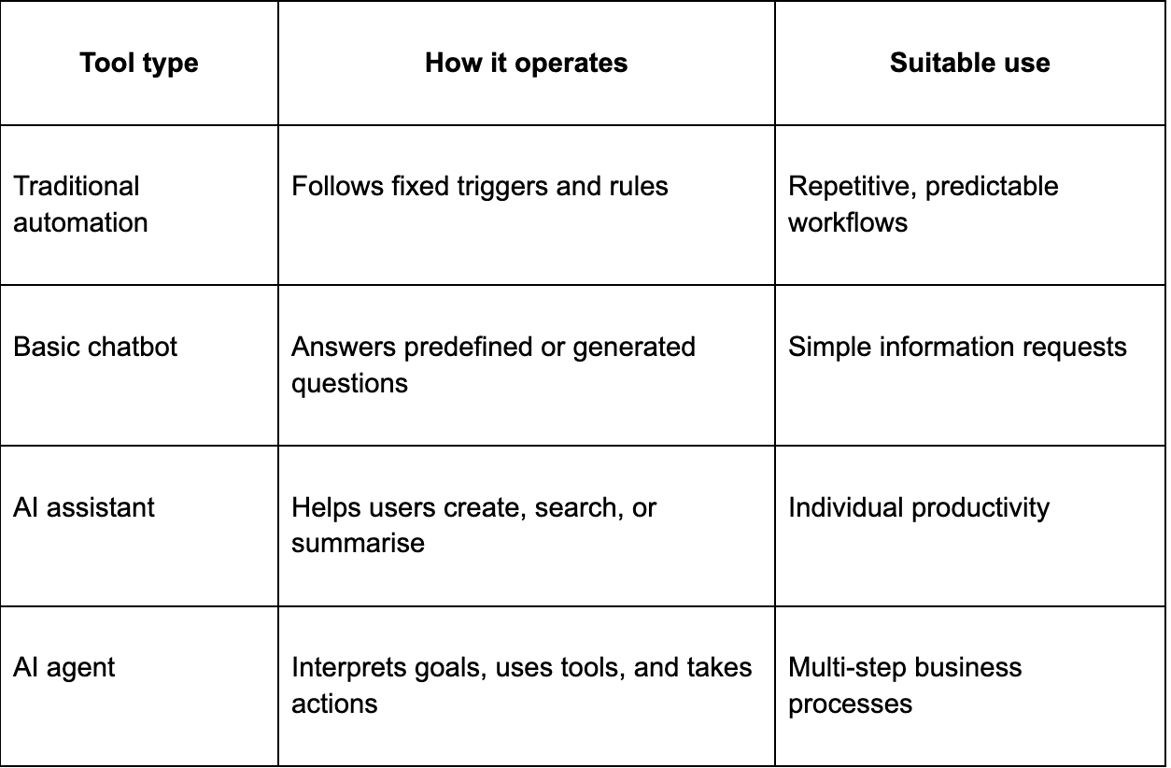
These categories can overlap, and not every task requires an AI agent. Fixed automation remains more reliable for predictable workflows, while agents are better suited to changing context, language‑based tasks, and multi‑step decisions.
Everyday Business Processes That AI Agents Can Automate
AI agents are most useful in functions that involve repeated decisions, information handoffs, and coordination across several systems. The following examples show how they support different departments while keeping human oversight in place.
Customer Support
Customer‑support agents can answer common questions, identify the purpose of an inquiry, collect details, and route complex cases to the correct team. They may also update tickets, summarise earlier conversations, suggest replies, and provide support outside normal working hours.
HubSpot’s Breeze customer agent, for example, can answer questions using approved company content and update selected CRM fields. Human employees should still handle sensitive complaints, refunds, exceptions, and decisions requiring judgement.
Sales and CRM
Sales agents can research prospects, qualify leads, draft follow‑ups, schedule meetings, summarise calls, and update CRM records. This reduces administrative work and gives sales teams more time to focus on customers.
HubSpot’s tools can prepare company summaries before calls and retrieve CRM information through Microsoft integrations. Agents can then suggest the next action based on recent activity and the existing customer relationship.
Marketing
Marketing agents can organise audience segments, prepare content variations, monitor campaign results, and combine data from several platforms. They may also identify underperforming campaigns and suggest changes to the message, audience, or channel.
These tools should support rather than replace editorial oversight. Employees still need to verify claims, protect customer data, approve public content, and ensure recommendations match business goals.
HR and Recruitment
Recruitment agents can compare candidate skills with job requirements, prepare shortlists, schedule interviews, answer applicant questions, and support onboarding. Internal HR agents may also guide employees towards the correct policy, form, benefit, or support contact.
Workday reports that its Recruiting Agent can increase recruiter capacity and reduce review time. Its Candidate Experience agent also supports conversational engagement and interview self‑scheduling.
Finance and Administration
Finance agents can extract invoice data, compare it with purchase orders, identify missing details, route exceptions, schedule payments, and prepare reports. Administrative agents can also classify documents, complete forms, reconcile records, and send reminders.
SAP’s invoicing assistant supports invoice matching, payment scheduling, error reduction, and fraud detection. Clear approval rules are still needed for payments, unusual discrepancies, and compliance‑sensitive decisions.
Real Examples of AI Agents in Business
Several current platforms show how agent‑based automation supports real business operations:
- Microsoft Copilot Studio: Creates low‑code agents connected to business data and applications, including older websites and desktop systems.
- Salesforce Agentforce: Automates customer service and CRM tasks; Formula 1 expects an 80% improvement in response speed.
- OpenAI‑powered agents at Cars24: Handle over one million monthly conversation minutes and have improved resolution rates and turnaround times.
- Workday agents: Support recruitment, employee assistance, expenses, and finance using organisational HR and financial data.
- SAP Joule Agents: Automate invoicing, billing, financial closing, supply‑chain tasks, and other SAP‑based workflows.
These examples show that agents are most valuable in high‑volume processes with clear goals and accessible data. They reduce manual work, improve consistency, and help employees focus on cases requiring attention.
What Businesses Should Consider Before Implementing AI Agents
Businesses should begin with a narrow, measurable process rather than attempting to automate an entire department. A suitable first use case has repeated steps, a clear owner, reliable source information, and an obvious point where the agent must seek human approval. Before deployment, organisations should assess:
- Whether the underlying process is already clearly defined;
- Which data and applications the agent may access;
- How inaccurate or incomplete source data will be handled;
- Which actions require employee approval;
- How customer and employee information will be protected;
- How outputs, errors, and business results will be monitored;
- Whether staff understand the agent’s role and limitations.
Security is critical because useful agents may access confidential data or modify records. Businesses should apply least‑privilege access, giving each agent only the permissions required for its specific task. Expectations must also remain realistic, as agents can misread instructions, use outdated information, or make incorrect recommendations. Testing, audit trails, escalation paths, and human accountability help businesses improve efficiency without replacing responsible oversight.