ChatGPT is most students' default AI tool for a simple reason: it's already open, it's already familiar, and it can solve a homework problem well enough most of the time. The catch is that it wasn't built for studying specifically — it was built to answer anything, which means a physics problem, an email draft, and a recipe all get the same generic chat treatment. Gauth is one of the more prominent tools built to fill that specific gap: an AI study platform with four dedicated tools — Pro‑Level Solving, the AI Tutor, Study Converter, and AI Course — instead of one general‑purpose chat box. We tested all four to see whether that added structure actually earns a spot next to (or instead of) ChatGPT on a student's phone.
Pro‑Level Solving
This is the entry point most users will actually touch first: point a camera at a problem, or type it in, and Gauth returns a worked solution built with visuals, graphs, and tables rather than a bare final answer in plain text. On raw accuracy, this is the feature least likely to feel like an upgrade over ChatGPT — both tools get a standard algebra or physics problem right most of the time. The difference shows up in how the reasoning gets shown: a graphing problem comes back with an actual rendered graph, not a description of one, and a data‑heavy question comes back as a table rather than a paragraph of numbers. On multiple‑choice questions, Gauth also checked the answer against the remaining options rather than stopping once the correct one was found — something ChatGPT's replies didn't consistently do unless specifically prompted to. Turning an abstract concept into something a student can actually see, rather than just read, is the part of the pitch this feature is built to deliver on, and in testing it largely did.
AI Tutor
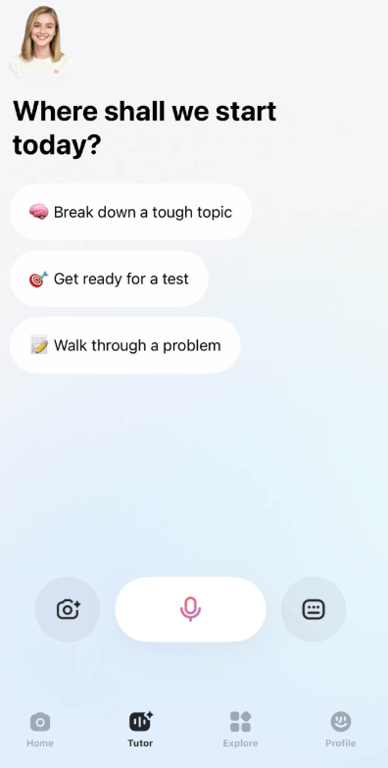
The AI Tutor is Gauth's clearest departure from a standard chat interface — and the feature that has no real equivalent in ChatGPT's default study mode. It's voice‑based and live, paired with a visual "blackboard" that fills in progressively as the explanation unfolds, rather than dropping a finished block of text all at once. In practice, that means a student can interrupt mid‑explanation — asking about one specific line without losing the thread of the whole walkthrough — which is a genuinely different interaction than typing a follow‑up question and waiting for a new reply. It's also the feature most likely to have an adjustment period: talking through a math problem out loud isn't everyone's instinct, and it works better in a quiet room than a shared study space. For students who do take to it, though, it's closer to sitting next to a tutor than to using an app.
Study Converter: The Student's Second Brain
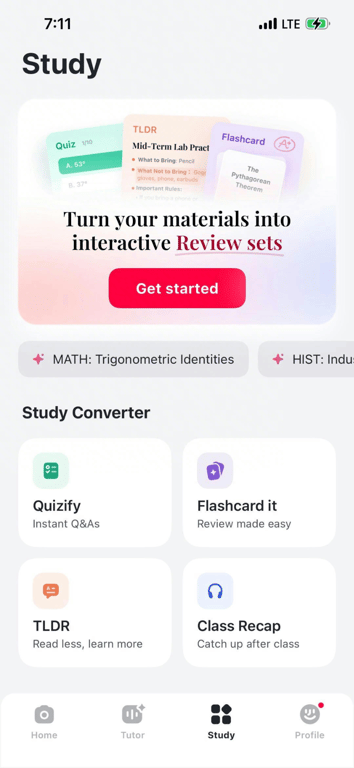
Real student material rarely shows up clean, and Study Converter is built around that mess rather than around a tidy textbook problem. Dump a lecture recording, a photo of a whiteboard, or a page of handwritten notes in one tap, and it returns flashcards, a structured overview, and a practice quiz in a single pass. The point isn't just speed — it's freeing up the mental bandwidth normally spent transcribing and organizing, so a student can study on the go instead of doing that setup work first. This is the feature that saves the most actual time in testing — not because any single output is dazzling, but because it replaces three or four separate steps with one. It's a less flashy feature than the AI Tutor, but it's arguably the one doing the most unglamorous, practical work.
AI Course
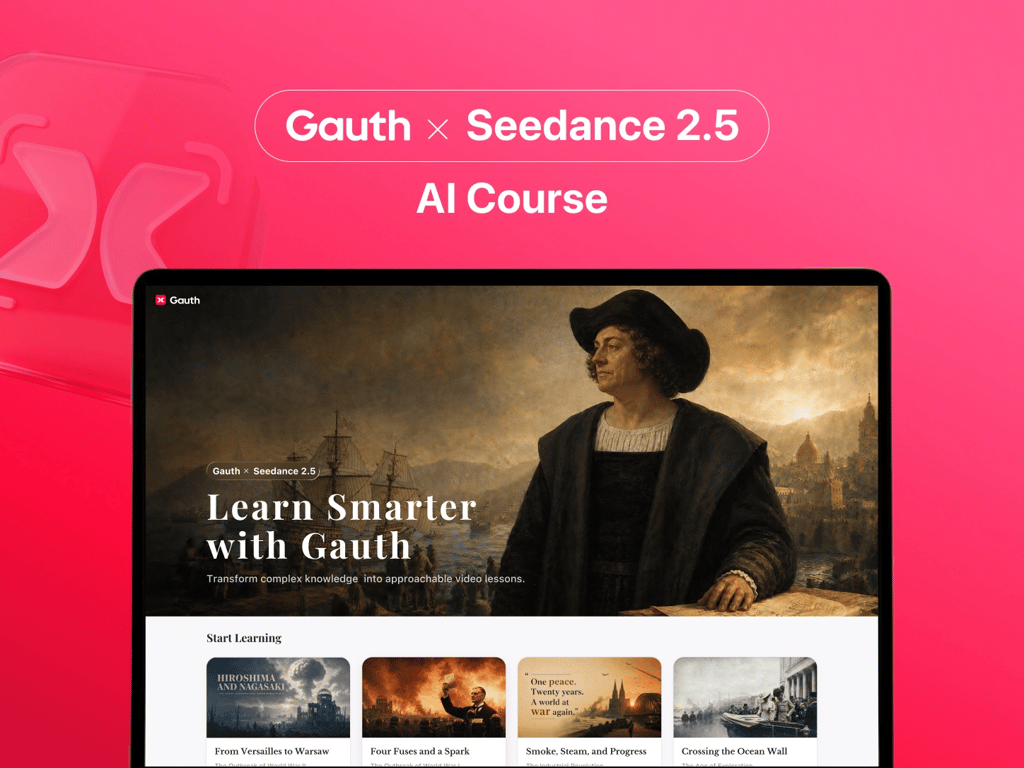
AI Course is the newest addition to the platform, and it's a different kind of feature from the other three: instead of solving a problem or organizing existing notes, it turns dense reading material — a chapter, a set of assigned notes — into AI‑generated video lessons with contextual explanations, and a real‑time Q&A layer connected directly to the AI Tutor for follow‑up questions mid‑lesson.
The logic behind it is sound: a lot of learning failure happens at the point a student disengages from a wall of text, not at the point the material actually gets hard. In testing, it delivered on that idea for shorter, more structured material, turning what would've been a flat reading assignment into something closer to a short video lecture. It was less consistent on longer or more conceptually dense chapters, which tracks — this is the least mature feature in the lineup, and it shows in places. Gauth cinematic AI course is powered by Seedance 2.5.
⭐As Business Insider reported this week, Gauth now counts 86 million monthly active users, a 760% increase since 2023 (https://www.businessinsider.com/seedance‑bytedance‑education‑push‑study‑app‑gauth‑ai‑animations‑2026‑7). That kind of growth curve is worth factoring into how much benefit‑of‑the‑doubt AI Course deserves at this stage — a feature this new, inside a platform scaling this fast, is exactly the combination where "worth trying, worth a slightly more cautious read" applies most.
Pros and Cons
Pros:
- All four tools live in one app, covering the full study cycle — preview, practice, review, and Q&A — instead of requiring three or four separate apps
- Solutions are consistently formatted with the reasoning shown, not just the final answer
- Study Converter meaningfully cuts down the manual work of turning raw lecture material into usable study content
- The AI Tutor's voice‑and‑blackboard format offers a genuinely different learning mode than a standard chat interface
Cons:
- AI Course is still the least consistent feature, particularly on longer or more conceptually layered material — better suited right now to shorter, well‑structured content
- The voice‑based AI Tutor has a real onboarding curve and isn't a fit for every environment or every learning style
- Because the platform routes questions across multiple models, answer formatting can vary slightly more than it would with a single consistent model
None of these are dealbreakers so much as fit issues. For a single, fast answer to check your own work, ChatGPT still does the job and is already installed. Where Gauth earns its place as an alternative — or a companion — is the recurring workload: a full course load, week after week, where consistent formatting, organized notes, and a tutor that doesn't need re‑explaining actually compound over a semester in a way a general chat tool isn't built to support.
⭐Gauth’s star rating on the App Store: 4.8–4.9
"AMAZING app for the free experience. Almost always correct with so many options: math, biology, science, and others. Highly recommend downloading to see how it works. You'll never want to get rid of it. It has a built‑in calculator and converter. When you are taking a photo to submit to AI, it has a flashlight option and so many other benefits."
— from an App Store user review.
Conclusion
Gauth isn't trying to out‑answer ChatGPT on a single question, and on that narrow test, it mostly doesn't. Its case is built on everything around the answer: explanations you can actually see instead of just read, a tutor built for a genuine back‑and‑forth instead of a static reply, and a way to turn a semester's worth of messy material into something usable without four separate apps doing it piecemeal. For a student who only needs an occasional answer checked, that's more than necessary. For a student trying to get through an entire course, it's a meaningfully different tool than the one already open on their phone.
About Gauth — Gauth began as a simple photo‑based math solver and has grown into a broader academic support platform, covering subjects from STEM to humanities for students from middle school through college. Built by GauthTech Pte. Ltd., it's used by students worldwide who move between problem‑solving, note organization, and test prep inside a single app rather than several. The platform is available on iOS, Android, and the web, with new features continuing to roll out as the product develops.
Stuck on your homework or studying? Give this AI study companion a try — visit Gauth, or download it for iOS / Android.